


GPT-6 and the Intelligent UI: What an Interface That Builds Itself Means for Enterprise Software
OpenAI’s Intelligent UI lets ChatGPT build charts, forms and small tools inside its answers. For enterprise software, the interface question is becoming a governance question.
An answer that arrives as an interface
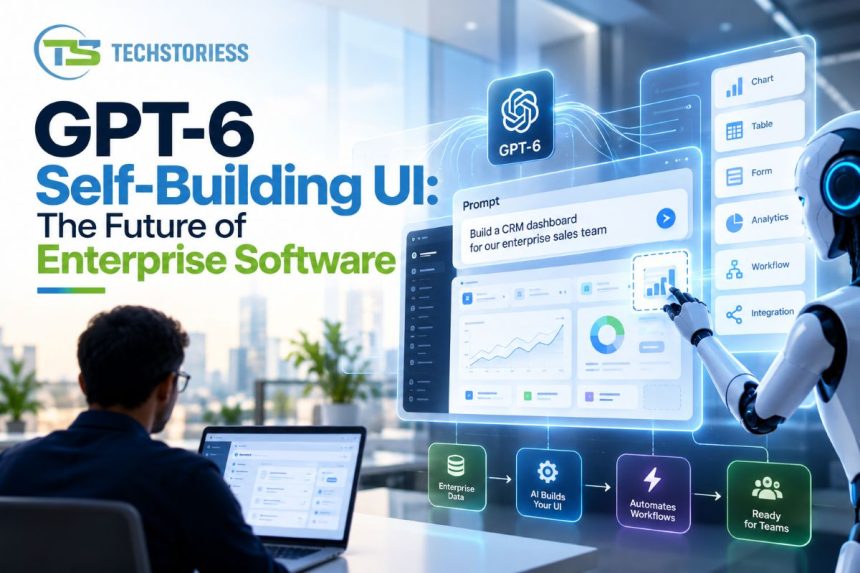
On October 7, OpenAI began rolling out GPT-6 in ChatGPT with a capability it calls Intelligent UI. Instead of replying only in text, the model can compose a response from text, graphics, tappable buttons, forms, charts and interactive elements, and it picks the mix based on the question. A comparison can appear side by side. An explanation can become an interactive diagram. Users can also ask for a small tool, such as a savings calculator or a bill splitter, and get one inside the conversation.
When plain text is the most useful answer, OpenAI says ChatGPT still gives plain text. Plus, Pro, Business and Enterprise plans are served by GPT-6 Sol, Free and Go users get GPT-6 Luna, and OpenAI puts ChatGPT’s weekly audience above 1.2 billion people. Enterprise availability depends on workplace admin settings.
Much of the coverage treated this as a consumer upgrade. For anyone who buys, builds or runs enterprise software, it deserves a closer look, because it changes where the interface comes from.
How OpenAI built it and why it matters
The mechanism is more instructive than the demo. OpenAI says it built a library of native, streamable components and a compiler that processes the interface while the model is still generating it, so the screen appears progressively. The library gives every response a consistent design base, and the model decides how the pieces fit together. OpenAI also trained the model to judge when interactivity helps and when text is enough, and it evaluated the generated interfaces for clarity, usefulness and completeness.
Notice what OpenAI did not do. It did not let the model draw whatever it liked on a blank canvas. It constrained the model to a defined set of components. That is the pattern enterprises should copy: the model composes, but only from parts the organization has approved.
OpenAI also states that work remains on the model’s design judgment. A company deploying this inside a finance or HR workflow should read that as a quality-control warning, not a footnote.
What changes for enterprise software
OpenAI’s framing is ambitious. It says people have spent decades learning how to use software, and that in the future software will adapt to people. Whatever the timeline, three shifts follow from that direction.
The interface becomes an output. Today a screen is a fixed artifact: designed by a product team, tested, documented and taught in training sessions. With generated interfaces, the screen is produced per request. A sales leader asks for pipeline risk by region and gets a filterable chart. A procurement manager asks to compare three vendors and gets a side-by-side view with an approval button. The workflow no longer depends on someone having built that exact screen in advance. For internal tools that are mostly forms over data, this challenges the backlog of small requests that IT teams carry. Speed helps the case: OpenAI reports that GPT-6 Instant starts answering web-search questions 44% sooner than GPT-5.6 Instant, and because the interface renders progressively, these screens can appear fast enough for daily work.
Value moves down the stack. If a capable model can present data well, a software vendor’s differentiation shifts to what sits beneath the screen: the data model, permissions, business logic and integrations. My read is that vendors whose main advantage is a polished front end should expect harder questions at renewal, while vendors with deep systems of record, clean APIs and strong access controls are better placed. A generated interface still needs something trustworthy to read from and write to.
The pattern will not stay with one vendor. A GitHub project published by thesysdev, built on the OpenUI standard, already recreates the Intelligent UI experience and can run against local models. It describes itself as independent of OpenAI. Enterprises that want to avoid lock-in can expect to build the same pattern on their own stack.
The risks of a CXO should price in
A screen that changes with every request creates problems that fixed screens never had. None of them is a reason to wait. They are reasons to decide the rules before employees start using generated screens on company data.
Consistency. If two employees ask the same question and see different layouts, training material, support scripts and audit screenshots stop matching. Teams that follow a documented procedure need a way to pin the interface for sensitive tasks.
Action safety. A chart is harmless. A button that approves a payment, changes a customer record or sends a message is not. Every generated action should call an existing API under the user’s own permissions, and nothing else. The model should never be able to invent a path into a system. This is the same principle behind limiting what AI agents can touch: scope the access first, then let the model compose.
Accountability. When a model builds a form and a user submits it, who owns the outcome if the form asked for the wrong field or left out a required one? Someone must own interface quality, the way a product owner does today.
Records. If a screen exists only for a moment, the organization needs a log of what interface was shown, what data it displayed and what the user did. Without it, an audit has little to examine.
Accessibility. Fixed interfaces can be tested against accessibility standards. Generated ones need the same standards built into the component library, since every screen is assembled from those parts.
What should you do this Quarter
The scope of OpenAI’s release sets its own limits. It applies to the Chat experience in ChatGPT, and the models behind Work and Codex are not changing with this update. The announcement does not describe how Intelligent UI will reach the API, which is the route most software teams would use to embed it in their own products. Plan for a pilot, not a platform decision.
Practical steps for a technology leader
1. Check admin settings. Decide deliberately who gets Intelligent UI and with which data.
2. Start read-only. Reporting, comparisons and analysis carry low risk. Hold write actions until permissions and logging are tested.
3. Audit internal tools. List the applications that are mainly forms and tables over a database. These are the first candidates for generated interfaces, and the first places where a vendor’s fixed screen is hard to justify.
4. Define the component library. Your own design system, or one from a vendor, should be the only palette a model can compose from.
5. Name an owner. One person is accountable for interface quality, logging and exceptions.
Conclusion
Intelligent UI is a consumer feature today, and OpenAI itself says its design judgment has room to improve. The direction is still clear. Interfaces are starting to be generated rather than shipped, and the governance questions that followed AI agents now apply to the screen itself. Organizations that treat this as a controlled design-system question, with approved components, scoped permissions and full records, will adopt it faster and with fewer surprises than those that treat it as a chat feature to switch on.