


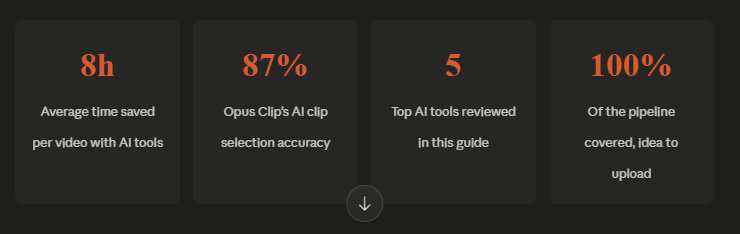
AI tools for YouTube video creation in 2026 are changing how makers create. And, even when you go and do everything manually, research and scripting, recording, editing and clipping, you are wasting superior time. AI creators working on videos have reported saving an average of 8 hours. That could be a difference between a single upload a week and multiple uploads.
- Why the AI Video Creation Pipeline Changes Everything
- 1. Descript – Best AI Tool for Editing Videos Like a Document
- 2. Opus Clip – Best for Turning Long Videos into Viral Shorts
- 3. Pictory – Best for Faceless YouTube Channels
- 4. ElevenLabs – Best AI Voice Generator for YouTube
- 5. Runway ML – Best for AI Visual Effects and Smart Editing
- How to Build a Complete AI Video Creation Pipeline
- What to Look for When Choosing AI Tools to Create YouTube Videos in 2026
- Honest Limitations of AI Video Tools
- Conclusion: Your AI-Powered YouTube Workflow Starts Now
- FAQ: AI Tools for YouTube Video Creation 2026
Production of YouTube videos used to take days and, in most cases, involved writers, editors, designers, voice performances and untold revisions. That process becomes obsolete in 2026.
Today, creators use AI tools for YouTube video creation 2026 to go from idea to upload much faster. These assist in enhancing production speed, reducing work, and ensuring uniformity. With more time saved, there is increased growth and reduced burnout.
Regardless of whether your subscriber base operates behind a faceless channel, a personal brand, a tutorial channel, a podcast, or a business page, in the modern day, AI tools can be used to write scripts, add voiceovers, make edits, create captions, thumbnails, Shorts, and more.
We discuss five of the most popular tools in this guide: Descript, Opus Clip, Pictory, ElevenLabs and Runway ML. You will discover what each will do, how it will be relevant to your work process, and how they could be combined to produce content more quickly.
Why the AI Video Creation Pipeline Changes Everything
Conventional video-making is time-consuming and cumbersome. You have a concept in mind and build a script over the course of hours. Then you film, make errors, and fumble around as you go. You edit the three-hour cut you’ve made, rushing to turn it into short-form clips for Shorts and Reels. Most creators get burned at the editing phase.
The AI-supported pipeline inverts this. Rather than struggle, you can use AI to handle the heavy lifting throughout. Rely on AI for script generation, voiceover, editing, and re-purposing. Focus on ideas and creative decisions. The outcome is accelerated production, greater consistency, and less burnout for creators.
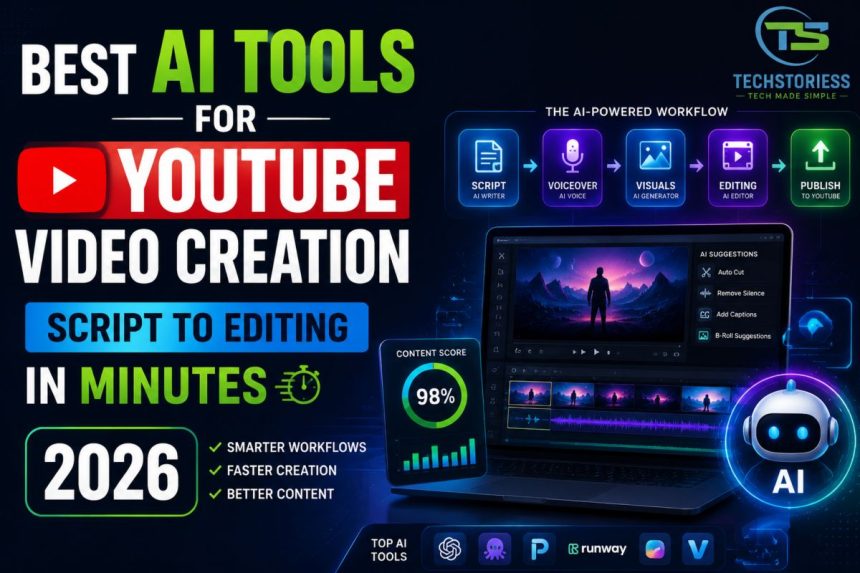
Here’s what a modern AI tool for a YouTube content pipeline looks like from idea to upload:
1. Idea & Script
Use Claude or ChatGPT to generate an SEO-researched video outline and full script in minutes.
2. Voiceover
ElevenLabs converts your script to a natural-sounding voice clone in seconds.
3. Video Assembly
Pictory automatically builds a full video from your script + stock footage.
4. Editing & Cleanup
Descript removes filler words, fixes pacing, and lets you edit video by editing text.
5. Visual Effects
Runway ML adds cinematic B-roll, background removal, and AI-generated scenes.
6. Short-Form Clips
Opus Clip scans your long video and auto-generates the most viral clips for Shorts and Reels.
Best AI Tools for YouTube Video Creation 2026
1. Descript – Best AI Tool for Editing Videos Like a Document
Descript is one of the smartest AI video editing tools for YouTubers because it lets you edit video by editing text.
If you delete a sentence in the transcript, the video cut happens automatically. That saves huge editing time.
Why It Stands Out:
- Text-based editing
- Auto transcription
- Remove filler words
- Studio sound cleanup
- Screen recording
- Multi-track podcast editing
Best For:
- Talking-head creators
- Interview channels
- Podcast YouTubers
- Course creators
Example Use Case:
Record a 30-minute video, upload it, delete awkward lines in text form, and export clean edits in minutes.
If speed matters, Descript is one of the best AI tools to create YouTube videos 2026.
2. Opus Clip – Best for Turning Long Videos into Viral Shorts
Opus Clip is built for creators who want to reach through short-form content.
AI picks out the best parts of long videos and makes them into short, vertical videos with captions. Reported AI clip accuracy reaches around 87%, making it one of the strongest repurposing tools available.
Why It Works:
- Detects hooks and strong moments
- Auto reframes the speaker on the screen
- Adds animated captions
- Converts landscape to vertical
- Creates multiple clips from one video
Best For:
- Podcasters
- Coaches
- Interview creators
- Educational channels
Example Use Case:
Upload a one-hour podcast and get 15 ready-to-post Shorts. For growth creators, this is among the best AI tools for YouTube video creation 2026.
3. Pictory – Best for Faceless YouTube Channels
Pictory turns scripts or blog posts into full videos using stock footage, visuals, music, and captions.
It is ideal for creators who do not want to appear on camera.
Why It Helps:
- Script-to-video creation
- Blog-to-video conversion
- Auto captions
- Stock media library
- Fast exports
Best For:
- Motivation channels
- Finance explainers
- News summaries
- Educational faceless channels
Example Use Case:
Paste a script on “Top 5 Budget Phones” and get a ready-made video with scenes and text. If you want the best AI for YouTube scripts and editing, Pictory is strong for faceless automation.
4. ElevenLabs – Best AI Voice Generator for YouTube
Great audio keeps viewers watching. ElevenLabs creates natural voiceovers that sound human, emotional, and polished.
It is far ahead of robotic text-to-speech systems.
Why Creators Use It:
- Human-like voices
- Multiple accents and tones
- Voice cloning options
- Fast script-to-audio workflow
- Multilingual support
Best For:
- Faceless channels
- Narration videos
- Story channels
- Explainer videos
Example Use Case:
Type a long script, pick a voice, and get a studio-level voiceover in minutes. For faceless creators, this belongs on every list of AI tools for YouTube video creation 2026.
5. Runway ML – Best for AI Visual Effects and Smart Editing
Runway ML brings high-end AI visuals to normal creators.
You can remove backgrounds, generate scenes, extend shots, and create cinematic edits without advanced skills.
Why It Is Powerful:
- Background removal
- Text-to-video generation
- Motion graphics tools
- Object cleanup
- Scene expansion
Best For:
- Creative YouTubers
- Film channels
- Ads and promos
- Visual storytelling
Example Use Case:
Need a futuristic city background for an intro? Generate it inside Runway. This makes it one of the most advanced AI video creation and editing tools in 2026.
How to Build a Complete AI Video Creation Pipeline
The real power of these AI video editing tools for YouTubers isn’t using them in isolation — it’s stacking them into a connected workflow. Here’s a practical pipeline based on channel type:
For on-camera creators
- Write your script with an AI writing assistant
- Record your video as normal
- Import into Descript to transcribe, clean filler words, and rough-cut
- Use Runway ML to replace backgrounds or add B-roll
- Feed the final video into Opus Clip to generate Shorts automatically
For faceless or automation-focused channels
- Generate a script with an AI writing tool
- Convert script to voiceover using ElevenLabs
- Build the full video in Pictory using the voiceover + auto-matched footage
- Export and run through Opus Clip for short-form distribution
The biggest mistake creators make is treating AI tools as individual upgrades. The 8-hour time savings come from connecting them into a pipeline — not just using one.
What to Look for When Choosing AI Tools to Create YouTube Videos in 2026
Not every tool in this space delivers equal value. When assessing an AI tool for video creation, consider several factors.
- Output quality: Does the video look professional, or does the AI feel artificial?
- Pipeline fit: Will this tool integrate with your current tools?
- Accuracy: With tools like Opus Clip, how often do AI decisions need manual correction?
- Voice naturalness: Can listeners recognise an AI voice after 10 minutes?
- Export speed: Some tools take 20+ minutes to process video, reducing efficiency.
- Pricing vs volume: Many tools charge per-minute rates for video. Run the math for your publishing frequency before committing.
Honest Limitations of AI Video Tools
In 2026, the first version is truly impressive. However, AI video creation and editing tools come at a cost. It is helpful to be aware of these issues before getting frustrated.
Voiceover systems like ElevenLabs have issues with complex pronunciation. Technical jargon, foreign names, and odd phrasing may sound monotonous or clichéd. Video generation tools like Pictory sometimes pick related but unsuitable stock footage. Human evaluation is needed. Opus Clip’s 87% accuracy means roughly 1 in 8 clips will need editing before publishing.
These aren’t dealbreakers. They’re cues to keep a light human review layer in your workflow rather than going fully hands-off. The goal is 80% automation, not 100%.
Conclusion: Your AI-Powered YouTube Workflow Starts Now
The best AI tools for YouTube video creation 2026 aren’t just productivity hacks — they’re a structural shift in how content gets made. Descript removes the tedium of editing. Opus Clip handles your entire short-form strategy automatically. Pictory builds videos from words. ElevenLabs gives your scripts a voice. Runway ML elevates your visual quality beyond what a small crew could achieve manually.
Start by selecting a single tool to address your biggest production bottleneck. If editing is killing your time, start with Descript. If you’re not publishing Shorts, start with Opus Clip. If voiceover is the missing piece for your faceless channel, start with ElevenLabs. Add tools as your workflow grows.
The 8-hour saving isn’t hypothetical. It’s what happens when each stage of your pipeline stops being a manual grind.
FAQ: AI Tools for YouTube Video Creation 2026
What are the best AI tools for YouTube video creation 2026?
Pictory, ElevenLabs, Runway ML, Descript, and Opus Clip form the strongest end-to-end pipeline. They cover scripting, voice, visuals, editing, and clipping.
How much time do AI tools actually save YouTubers?
On average, creators save 8 hours per video through AI-supported scripting, editing, and repurposing automation. Reports indicate this can reduce total production time by 70% or more.
Do I need video editing experience to use these AI video creation and editing tools?
No. Most are designed for beginners. Descript’s text-based editing and Pictory’s one-click video builder require zero traditional editing skills.
Are these AI tools good for YouTube Shorts as well as long-form videos?
Yes. Opus Clip specialises in turning long videos into Shorts. Pictory and Runway also export vertical formats optimised for mobile.
How much do the best AI tools for YouTube cost in 2026?
Most start between $12–$29 per month. Many platforms offer free trial plans, and annual billing often saves 20–35%. Always check for the latest plans available in your location.
Ready to cut your video production time in half?
Choose a tool from this guide now and create your next video with confidence. Start with Descript if you edit on camera, or Opus Clip if you want instant Shorts from your existing content. Your workflow will never look the same.