



Key Takeaways
Canva wins on speed, price, and ease of use. Adobe wins on creative control and professional-grade output. Most teams get the best result by using both — Adobe for the assets that need precision, Canva for everyday content at scale.
- Key Takeaways
- At a Glance: Canva vs Adobe in 2026
- What Are Canva and Adobe, Really?
- Pricing Breakdown
- Ease of Use: Built for Designers vs. Built for Everyone
- Design Quality and Creative Control
- Canva Pro vs Adobe Creative Cloud: The Real Difference
- Canva vs Adobe for Marketing Teams
- Canva vs Adobe Express
- The Hybrid Use Case: Why “Both” Is Often the Right Answer
- Which Tool Should You Choose? A Quick Framework
- Final Verdict: Canva vs Adobe 2026
- Conclusion & Key Takeaways
- FAQs About Canva vs Adobe 2026
- Ready to Choose Your Design Tool?
Design software changed fast over the last few years. Templates, drag-and-drop editors, and shared brand kits now let almost anyone produce decent-looking content in minutes, no design training required. That shift is what keeps the Canva vs Adobe 2026 debate alive.
Both companies are dominant, just in different lanes. Canva ended 2025 with more than 265 million monthly active users and over 31 million paying subscribers. Adobe Creative Cloud, meanwhile, has grown to an estimated 41 million paid subscribers, with steady double-digit annual growth in its Creative segment. Both numbers point to the same conclusion: there’s room for both tools, and the debate isn’t going away.
So which one should you actually use in 2026? It depends less on brand loyalty and more on the job in front of you. Here’s the full breakdown.
At a Glance: Canva vs Adobe in 2026
| Canva | Adobe Creative Cloud | |
|---|---|---|
| Starting price | Free; Pro at $120/year ($15/month)[3] | Free trial only; Standard plan ~$660/year, Pro plan ~$840/year[4] |
| Learning curve | Minutes to first result | Weeks to months for real proficiency |
| Best for | Non-designers, marketing/HR/social teams, small businesses | Professional designers, photographers, video editors, agencies |
| Output quality (print/pixel-precision) | Good for digital, limited for print-grade work | Industry standard |
| Team collaboration | Strong (Brand Hub, template locking, shared folders) | Strong, but built around individual creative workstations |
| AI tools | Magic Studio (write, resize, erase, generate) | Firefly (generative fill, image extension) |
| Users / subscribers (2026) | 265M+ monthly active users, 31M+ paying | ~41M paid subscribers [2] |
What Are Canva and Adobe, Really?
It helps to start with what each platform is actually built to do, since they solve different problems more than they compete head-on.
What Is Canva?
Canva is a web-based design tool built around speed. It lets people with no design training put together presentations, ads, social graphics, resumes, videos, and documents.
Its core strength is accessibility: pick a template, swap in your text and images, adjust colors, and publish — often in under 10 minutes.
Best for: small businesses, content creators, marketing teams, HR teams, students, and anyone without formal design training.
What Is Adobe Creative Cloud?
Adobe Creative Cloud bundles professional tools — Photoshop, Illustrator, InDesign, Premiere Pro, and more — for artists, designers, photographers, and video editors who need precise, pixel-level control over their work.
Adobe’s tools are built for high-end production: deeper file handling, more granular editing, and export options that Canva doesn’t attempt to match.
Best for: professional designers, agencies, photographers, video editors, publishers, and creative teams.
They overlap mainly in the middle ground — daily marketing content — which is where most real-world comparisons happen.
Pricing Breakdown
Cost is usually the first thing people ask about, and the gap here is real, even after both companies have raised prices since this comparison was last relevant.
Canva offers a genuinely usable free tier with thousands of templates and basic tools. Canva Pro runs $15/month, or $120/year when billed annually (about $10/month effective), and adds premium templates, brand kits, the background remover, and Canva’s Magic Studio AI tools.<sup>[3]</sup>
Adobe Creative Cloud restructured its plans in August 2025. The old “All Apps” plan is now split into Creative Cloud Standard (~$54.99/month, about $660/year) and Creative Cloud Pro (~$69.99/month, about $840/year), with Pro adding full mobile/web access and a much larger Firefly AI credit pool.<sup>[4]</sup> Single-app plans are cheaper: Photoshop alone runs about $22.99/month (~$276/year).<sup>[4]</sup>
Do the math and Adobe’s core plan costs roughly 5.5 times more per year than Canva Pro; the fuller Creative Cloud Pro plan runs closer to 7 times more. Even buying just Photoshop by itself costs more per year than a full Canva Pro subscription.
That gap doesn’t automatically make Adobe the worse deal. It’s a professional-grade ecosystem without a real substitute — if your work genuinely needs Photoshop, Illustrator, and heavy vector tools, the price pays for itself quickly. A freelancer who just needs quick social graphics has an easy call in Canva. A designer who sells finished creative work has an easier case for Adobe’s higher price.
Verdict: If affordability is the deciding factor, Canva wins clearly.
Ease of Use: Built for Designers vs. Built for Everyone
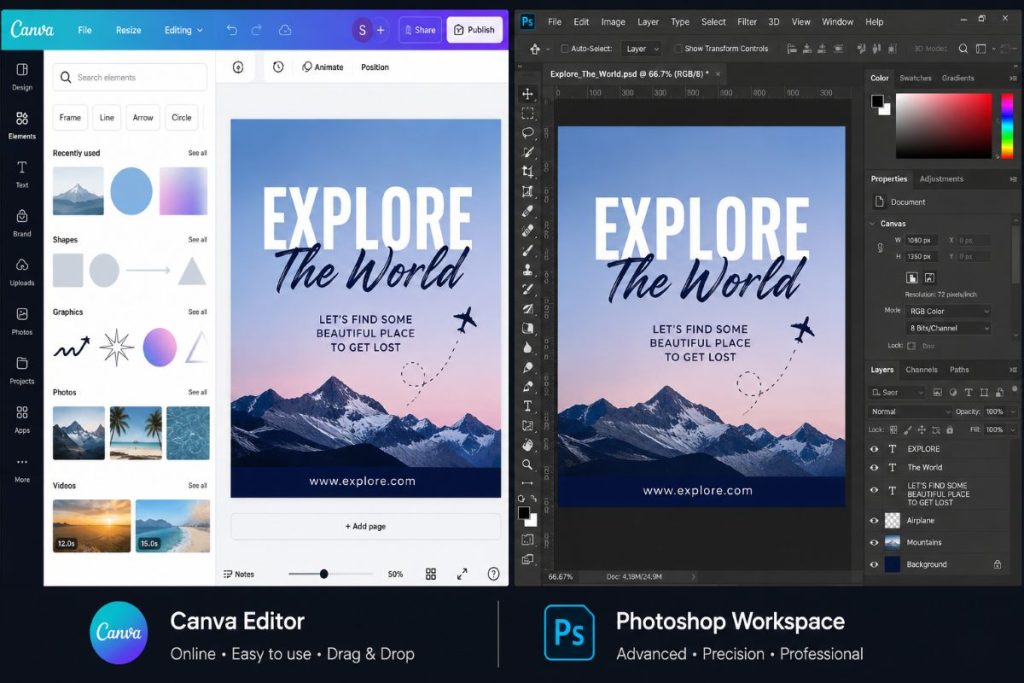
This is where the two tools diverge hardest.
Canva: Made to Be Intuitive
Canva’s whole philosophy is drag-and-drop simplicity. Pick a template, insert your text and images, adjust the colors, done. No layers, no masks, no blend modes, no steep learning curve.
That’s genuinely useful for non-designers — small business owners, social media managers, HR teams, teachers — who can produce professional-looking content in under 10 minutes without a single tutorial.
Adobe: Powerful, But It Costs You Time to Learn
Adobe’s tools are extraordinarily capable, but they demand an investment. Photoshop can take months to use well. Illustrator’s Bezier-curve logic trips up plenty of newcomers. InDesign’s interface rewards people who already know it and confuses everyone else.
None of that makes Adobe bad — it makes it powerful in the right hands. Photoshop can do things Canva can only approximate, and an experienced designer will get more out of it than a template ever could. But for someone who needs an urgent LinkedIn graphic or a team deck by end of day, that learning curve is a real cost, not a footnote.
A practical example: picture a restaurant owner making an Instagram poster for tonight’s special. In Canva, a decent version is realistically ready in under 10 minutes using a template. In Photoshop, the same result is achievable, but only after real time invested in learning the tool — the payoff is more control, not more speed.
Verdict: For non-designers, Canva is the clear pick in most cases.
Design Quality and Creative Control
This is where Adobe stays firmly in the lead.
Canva produces professional-looking output fast, but it works within template constraints. Adobe gives you pixel-level editing, advanced effects, color grading, retouching, and fully custom vector work.
Canva offers:
- 250,000+ templates covering nearly every format.
- A large stock photo and illustration library.
- AI features like Magic Write, Magic Media (image generation), and background remover.
- Video and presentation tools.
- Basic photo filters and adjustments.
- Brand Kit for consistent visual identity across a team.
Adobe Creative Cloud offers:
- Photoshop’s full layer, masking, and retouching toolkit.
- Illustrator’s precision vector path tools.
- InDesign for professional print layout.
- Premiere Pro and After Effects for video editing and motion graphics.
- Advanced typography and color management across every app.
- Firefly AI integration for generative image editing.
Adobe is more advanced across nearly every dimension. But Canva covers roughly 90% of what most everyday users actually need, in a fraction of the time.
On output quality specifically: for professional print work, brand identity systems, or pixel-precise ad assets, Adobe produces better results — its export resolution, color profile management, and file format options are built for that level of precision. For everyday digital content — social posts, email headers, presentations, web graphics — Canva’s output quality holds up well; most people looking at a well-made Canva post won’t be able to tell it wasn’t built in Illustrator.
Verdict: For professional-grade output, Adobe wins.
Canva Pro vs Adobe Creative Cloud: The Real Difference
Canva Pro includes: premium templates, background remover, brand kits, team collaboration, AI writing/design tools, and social scheduling.
Adobe Creative Cloud includes: Photoshop, Illustrator, Lightroom, Premiere Pro, InDesign, Acrobat, and Firefly AI tools.
The real difference: Canva Pro gets you to a finished, presentable result faster. Adobe Creative Cloud gives you deeper creative control once you know how to use it.
Canva vs Adobe for Marketing Teams
Marketing teams are where this comparison gets genuinely mixed, because most teams have a blend of designers and non-designers.
A common, well-working split looks like this. A brand designer uses Illustrator to build the visual identity: logo, typography, color system. The rest of the team then implements that identity across day-to-day materials — social posts, ad creatives, email banners, internal decks — using Canva.
Canva Teams (part of Canva’s paid tiers) supports this hybrid model well. It offers:
- Shared brand kits with fonts, colors, and logos locked in place.
- Template locking, so team members can’t accidentally break brand guidelines.
- Real-time collaborative editing, similar to Google Docs.
- Role-based access controls for agencies managing multiple clients.
For marketing teams, this usually isn’t an either/or decision — it’s about dividing the work by who needs precision and who needs speed.
Verdict: For day-to-day campaigns, Canva usually wins. For flagship campaigns and brand-defining assets, Adobe typically leads.
Canva vs Adobe Express
Adobe’s direct answer to Canva is Adobe Express — a simplified, template-driven tool aimed at marketers, students, and casual designers.
Canva’s advantages: a larger template ecosystem, stronger team workflows, wider market familiarity, and a faster drag-and-drop experience.
Adobe Express’s advantages: tighter integration with the rest of Adobe’s apps, a stronger underlying image-editing engine, and solid brand-asset workflows.
Verdict: On overall usability, Canva still holds the edge over Adobe Express.
The Hybrid Use Case: Why “Both” Is Often the Right Answer
The clearest lesson from this comparison: using both tools together is often the most productive setup.
Professional designers use Adobe where precision matters — logo design, print layout, advanced photo work, product mockups. Those finished brand assets then move into Canva, where the wider team builds on-brand content without needing design training.
This is the model most agencies already run: a creative lead on Adobe, account managers and content teams on Canva. No design bottleneck, and everyone stays on-brand.
It’s also the cheaper hybrid: license Adobe for the one or two people who need it, and Canva Pro or Teams for everyone else. That’s a lower total cost than putting the whole team on Adobe CC, without losing output quality where it matters.
Which Tool Should You Choose? A Quick Framework
- Who’s doing the work? If it’s mostly non-designers producing everyday content, start with Canva. If it’s a trained designer or photographer, Adobe is the better foundation.
- What’s the output? Digital-only (social, email, presentations) favors Canva. Print-grade, pixel-precise, or brand-defining work favors Adobe.
- What’s the timeline? Need it in the next hour? Canva. Have days or weeks to get it exactly right? Adobe.
- What’s the budget? Under $150/year per person points to Canva Pro. A dedicated creative budget of $650+/year per person supports Adobe.
- Is it a team of mixed skill levels? If yes, consider the hybrid model: Adobe for the designer(s), Canva for everyone else.
When to Choose Canva
Canva is the better choice if you:
- Need to create visual content regularly and don’t have design training.
- Run a small business or brand and want fast, inexpensive design.
- Manage social media, email marketing, or internal communications.
- Need a tool the whole staff can use without training.
- Need to move quickly without sacrificing visual quality.
When to Choose Adobe
Adobe is the better choice if you:
- Work as a professional designer, photographer, or videographer.
- Handle complex, multi-layered projects that demand precision.
- Produce print-ready work with strict color and resolution requirements.
- Need advanced typography, illustration, or motion graphics.
- Work in a field where Adobe is the industry standard — agency, publishing, broadcast.
Final Verdict: Canva vs Adobe 2026
There’s no single winner here — only the right tool for your situation.
Canva is the obvious choice for small business owners, non-designers, and marketing teams. It’s faster, cheaper, and easier to use without giving up the visual quality most everyday digital content needs.
For professional designers and creative agencies, Adobe still wins on depth, precision, and industry standing. Nothing else fully replaces what it does.
The best choice isn’t about brand loyalty — it’s about matching the tool to the job.
Conclusion & Key Takeaways
Both platforms are excellent. They just solve different problems.
Canva made design accessible to everyone. Adobe still sets the professional standard. If you need content fast, choose Canva. If you’re building creative assets that need real depth, choose Adobe. If you want both scale and quality, use both.
Key takeaways:
- Canva has more than 265 million monthly active users and 31 million+ paying subscribers.<sup>[1]</sup> Adobe Creative Cloud has an estimated 41 million paid subscribers.<sup>[2]</sup> Both are large, trusted platforms.
- Canva Pro ($120/year) costs roughly 5.5x less than Adobe’s Creative Cloud Standard plan (~$660/year).<sup>[3][4]</sup> It costs about 7x less than Creative Cloud Pro (~$840/year).
- Canva wins on speed, accessibility, and cost. Adobe wins on output quality and professional-grade control.
- Combining both tools is often the most effective setup for marketing teams and agencies.
- Canva still leads Adobe Express on templates, team workflows, and overall usability.
- The right answer isn’t either/or. It’s whichever tool fits the job in front of you.
FAQs About Canva vs Adobe 2026
Which is better, Canva or Adobe, in 2026?
Canva is better for beginners and teams that need speed. Adobe is better for professionals doing advanced creative work.
Is Canva better than Adobe for non-designers?
Yes. Canva is easier to learn, faster to use, and significantly cheaper for someone without design training.
Canva Pro vs Adobe Creative Cloud: which offers more value?
Canva Pro offers better value for casual users and small businesses. Adobe offers more value to professionals whose income depends on advanced design or photo/video work
Canva vs Adobe for marketing teams: which wins?
Canva usually wins for day-to-day campaigns, templates, and team collaboration. Adobe tends to lead for flagship, brand-defining work.
Should professionals switch from Adobe to Canva?
Not entirely. Many professionals use Canva for speed on lower-stakes content but keep Adobe for high-end creative work that demands precision
Ready to Choose Your Design Tool?
Try the tool that fits your workflow. Use Canva if you need speed and simplicity, or Adobe if you need professional-grade creative control. Testing both against a real project is the fastest way to know which one fits how you actually work










Having read this I believed it was rather enlightening.
I appreciate you taking the time and effort to put this informative article together.
I once again find myself personally spending
way too much time both reading and posting comments.
But so what, it was still worth it!