


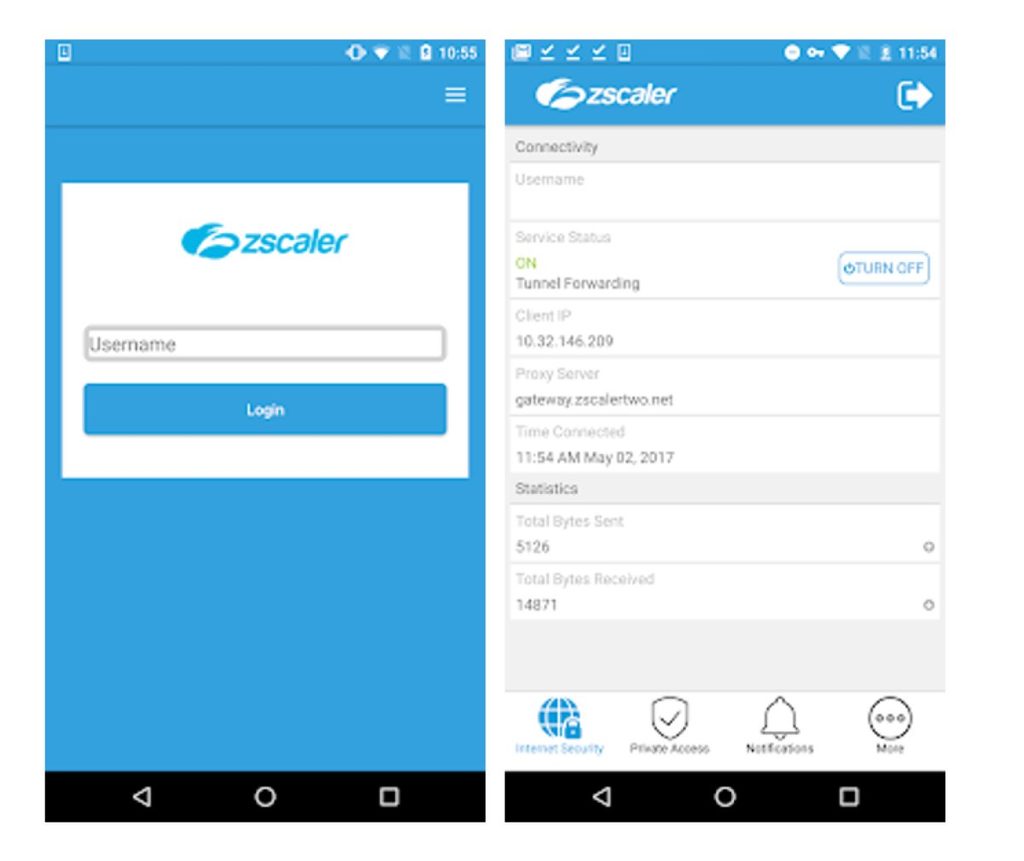
Security architecture discussions tend to live at the policy layer: segmentation rules, identity providers, inspection decisions. The part that touches the user is a small client on the device, and for mobile fleets published under the name Zscaler Inc, that client is the Zscaler App for Android. It bundles two modules, Zscaler Internet Access and Zscaler Private Access, into a single install.
That pairing is the whole point. Internet Access handles traffic heading out to the web and SaaS, routing it through inspection before it reaches its destination. Private Access handles the other direction, connecting the device to internal applications without putting it on the corporate network.
The traffic that traditional appliances never see
The store description makes an argument that still holds up. The majority of web traffic from mobile devices comes from apps, not standard browsers, which means a lot of it never passes through the inspection points a security team built its visibility around.
Mobility raised productivity and brought its own problems along with it. One of the larger ones is providing consistent security across devices the organization may not even own.
An endpoint client sidesteps that by sitting below the app layer. Traffic from a messaging app, an expense tool, or something an employee installed last week gets treated the same way as a browser session, because the tunnel does not care which process produced the packets.
Zscaler App is provisioned by IT, not picked by a user
This part matters because it shapes everything else that follows. Zscaler App is used with an active enterprise subscription to Zscaler’s Mobile Security service, and the vendor’s own guidance is to follow instructions from your IT organization.
There is no meaningful standalone mode. Without a tenant, an enrollment path, and policy pushed from the admin side, the client has nothing to connect to.
So the realistic audience is narrow and specific:
- Security engineers validating how policy behaves on a real device
- Help desk staff walking users through enrollment or re-authentication
- Mobility admins testing BYOD enrollment against a managed baseline
- Architects comparing how the Internet Access and Private Access paths resolve traffic
Everyone else sees the app only as an icon that appeared after an onboarding email.
Device Administrator access: the permission that triggers questions
The listing notes that the app uses the Device Administrator permission. On Android that is not a trivial grant, and it is the detail that generates the most questions during BYOD rollouts.
Practitioners rolling this out to personally owned hardware should expect pushback and should have an answer ready about what that permission covers and what happens at offboarding. Explaining it before enrollment is cheaper than explaining it after.
When enrollment lapses, the dashboard still looks clean
Zero trust designs assume the client is present and healthy. Users who disable it, skip the enrollment prompt, or factory reset a phone create policy gaps that look like coverage on a dashboard but are not. Monitoring enrollment state is as important as monitoring the policies themselves.
Where a Windows machine enters the picture
The desktop angle here is practical rather than architectural. When a support engineer is reproducing an enrollment failure, flipping between an Android build and a ticket window on a phone screen is tedious, and running the Android client inside an emulator such as BlueStacks on a Windows workstation puts the client and the admin console side by side. Some teams prefer LDPlayer for lighter test instances.
That is usually the scenario that sends someone looking for instructions on getting Zscaler running on a Windows machine, not to use it as a daily app but because a tunnel will not establish for one user group and the fastest way to see what the client sees is to put it next to the admin console. Keep in mind the emulated environment is a lab convenience, not a substitute for testing on the handset models your workforce carries, since device administrator behavior and VPN permission prompts vary across OEM Android builds.
Zscaler also ships native clients for Windows and macOS. For production coverage of laptops, those are the supported path, and the emulator route makes sense only for inspecting the Android experience itself.
Treat the client as one input, not the whole control
A client-based zero trust model is only as accurate as the enrollment data behind it. Devices drift, users swap phones, contractors leave, and the app happily keeps running on hardware that no longer belongs to anyone on the roster.
Pair the deployment with a periodic reconciliation between enrolled devices and your identity directory. The tunnel will do what it is told; the hard part is making sure the list of devices it protects still matches reality.